Introduction
Businesses can choose from four major cloud service models: IaaS, PaaS, SaaS, and FaaS. The main difference between them is how much of the IT environment the cloud provider handles and how much control remains with the business.
Instead of purchasing and maintaining servers and other hardware at their own location, organizations can use computing resources through the internet. These resources may include storage, software, servers, databases, and tools for developing applications. In 2026, cloud technology continues to help businesses support remote teams, manage data, develop applications, and scale their IT resources as requirements change.
The global cloud computing market was valued at approximately $943.65 billion in 2025 and is expected to reach $3.35 trillion by 2033, with a projected 16.0% CAGR.
So, how do you know which cloud model fits your business?
The right cloud model depends on your control, applications, development needs, and IT resources. This guide explains the main cloud service models and how public, private, hybrid, and multicloud environments work with them.
Key Takeaways
- The types of cloud computing services (IaaS, PaaS, SaaS, FaaS) support different business IT needs.
- Cloud computing improves scalability, security, and cost efficiency.
- Deployment models like public, private, and hybrid cloud offer flexibility and control.
- Trusted cloud computing service providers like Techproc help ensure smooth and reliable cloud operations.
What is Cloud Computing?
Cloud computing means using IT resources over the internet instead of relying entirely on hardware located at your business. Servers, storage, software, databases, and networking are a few examples of these resources.
For example, a company might store documents online, run its website on a virtual server, or use a cloud-based application for daily operations. The cloud provider handles the underlying physical infrastructure, while the business manages the services, applications, and data included in its setup.
One major advantage is flexibility. Businesses can increase or reduce resources as their needs change without purchasing additional physical equipment. Cloud services can also make remote access, application deployment, and day-to-day IT operations easier.
Simply put, cloud computing is the broader technology, while IaaS, PaaS, SaaS, and FaaS are different service models that define what the provider manages and what the customer controls.
What Are the Different Cloud Computing Service Models?
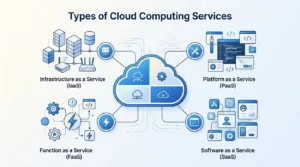
The four main types of cloud computing services are Infrastructure as a Service (IaaS), Platform as a Service (PaaS), Software as a Service (SaaS), and Function as a Service (FaaS). Each model provides a different level of control and management, from virtual infrastructure to ready-to-use software.
Cloud service model |
What it provides |
Best suited for |
IaaS |
Virtual servers, storage, and networking |
Businesses that need infrastructure control |
PaaS |
Development tools and application environments |
Teams building and deploying applications |
SaaS |
Ready-to-use software over the internet |
Everyday business applications |
FaaS |
Individual functions that run on demand |
Event-driven and serverless workloads |
1. Infrastructure as a Service (IaaS)
IaaS gives businesses virtual computing infrastructure through the internet. Instead of owning physical servers, an organization can provision virtual machines, storage, and networking resources from a cloud service provider.
How does IaaS work?
The provider takes care of the physical data center, servers, and core networking. The customer generally remains responsible for the operating system, applications, configurations, and data.
Common uses include:
- Hosting websites and business applications
- Running virtual machines
- Handling custom workloads and large datasets
- Setting up development and testing environments
- Increasing or decreasing computing capacity as needed
When should you use IaaS?
IaaS can be a good fit when your business needs more control over its computing environment but does not want to purchase and maintain physical infrastructure. It is often useful for customized applications and workloads with changing resource requirements.
Examples: Amazon EC2 and Microsoft Azure Virtual Machines.
2. Platform as a Service (PaaS)
PaaS gives developers a managed environment for creating, testing, and deploying applications. The cloud provider handles much of the infrastructure, allowing development teams to spend more time working on application code.
How does PaaS work?
The provider supplies the application runtime, development tools, frameworks, and supporting infrastructure. Developers primarily manage the application and its data rather than the underlying servers and operating systems.
Common uses include:
- Developing web and mobile applications
- Testing software
- Deploying applications
- Creating development environments
- Supporting application development teams
When should you use PaaS?
PaaS can make sense when developers want to build and release applications without spending significant time configuring and maintaining servers and operating systems.
Examples: Google App Engine and Microsoft Azure App Service.
3. Software as a Service (SaaS)
SaaS provides complete software applications through the internet. Users can typically access the software through a web browser or application without having to install and maintain the underlying infrastructure.
How does SaaS work?
The provider manages the application, servers, infrastructure, updates, and ongoing maintenance. Businesses generally manage user accounts, permissions, settings, and the data they place in the application.
Common uses include:
- Business email and communication
- CRM platforms
- File sharing and collaboration
- Project management
- Productivity software
When should you use SaaS?
SaaS is useful when employees need ready-to-use business software without the organization having to manage the infrastructure behind it. It can also simplify software updates and deployment across multiple users.
Examples: Google Workspace, Microsoft 365, and Salesforce.
4. Function as a Service (FaaS)
FaaS lets developers execute individual pieces of code when a specific event occurs. It is commonly used as part of a serverless architecture, where the cloud provider handles the servers and infrastructure required to run the code.
How does FaaS work?
A developer creates a function that runs when something triggers it, such as an API request, file upload, or database event. The cloud platform provides the resources needed to execute that function.
Common uses include:
- Processing application events
- Automating repetitive workflows
- Handling files and data
- Running API functions
- Creating event-driven applications
When should you use FaaS?
FaaS works well for short, independent tasks that only need to run when triggered. It can reduce the need to maintain servers that remain active even when the workload is not running.
Examples: AWS Lambda and Google Cloud Functions.
IaaS vs PaaS vs SaaS vs FaaS: What’s the Difference?
The main difference between IaaS, PaaS, SaaS, and FaaS is how much of the technology stack the cloud provider manages for you. IaaS gives you the most infrastructure control, while SaaS provides a ready-to-use application. PaaS focuses on application development, and FaaS runs individual functions when they are needed.
Cloud service model |
Provider typically manages |
Customer typically manages |
Common use |
IaaS |
Physical infrastructure, networking, and virtualization |
Operating system, applications, configurations, and data |
Hosting and custom workloads |
PaaS |
Infrastructure, operating system, runtime, and development platform |
Applications and data |
Application development |
SaaS |
Infrastructure, platform, and application |
Data, users, and configurations |
Business software |
FaaS |
Servers, runtime, and infrastructure |
Function code and related logic |
Event-driven workloads |
These cloud computing service models are not competing versions of the same service. Each one is designed for a different level of responsibility and technical control.
IaaS vs PaaS
IaaS gives organizations more control over infrastructure, while PaaS removes more infrastructure management so developers can focus on applications.
With IaaS, an IT team may manage virtual machines, operating systems, applications, and configurations. With PaaS, the provider manages much of the underlying environment, allowing developers to concentrate on writing, testing, and deploying code.
Choose IaaS when infrastructure customization and control are important. PaaS can make more sense when the priority is faster application development with less infrastructure management.
PaaS vs SaaS
PaaS is primarily a development platform, while SaaS is finished software that users can access and use.
For example, a development team might use PaaS to build a custom application, while employees might use SaaS for email, CRM, collaboration, or productivity tasks.
In simple terms:
- PaaS: Build and deploy applications.
- SaaS: Use an application that is already built.
SaaS vs FaaS
SaaS provides complete applications, while FaaS runs individual pieces of application code when triggered by an event.
SaaS is designed for end users who need business software. FaaS is mainly used by developers creating event-driven applications and automated processes.
This makes cloud computing and software as a service closely related, but they are not the same thing. SaaS is one specific cloud service model within the broader cloud computing ecosystem.
Which model gives you the most control?
IaaS generally provides the most direct control over the computing environment among these four models. PaaS shifts more infrastructure responsibilities to the provider, SaaS shifts most technical management to the provider, and FaaS abstracts server management for individual functions.
The right choice depends on what your organization needs to manage itself. A company that needs customized infrastructure may choose IaaS, while a team that wants ready-to-use business software may prefer SaaS.
What Are Cloud Deployment Models?
Cloud deployment models describe where a cloud environment is hosted, who can access it, and how the infrastructure is managed. The four common approaches are public cloud, private cloud, hybrid cloud, and multicloud.
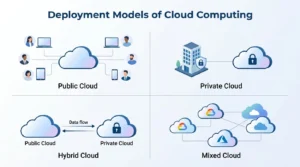
Unlike IaaS, PaaS, SaaS, and FaaS, deployment models do not describe the type of cloud service. Instead, they describe the environment in which cloud computing services operate.
Deployment model |
How it works |
Common use |
Public cloud |
Infrastructure is operated by a cloud provider and shared across customers |
Scalable business applications and workloads |
Private cloud |
Cloud infrastructure is dedicated to one organization |
Workloads requiring greater control |
Hybrid cloud |
Combines private and public cloud environments |
Organizations balancing control and scalability |
Multicloud |
Uses cloud services from two or more providers |
Flexibility, redundancy, or workload-specific needs |
Public Cloud
A public cloud uses infrastructure managed by a third-party cloud computing service provider. Organizations access computing resources through the provider rather than owning the underlying physical servers.
Common uses include:
- Hosting websites and business applications
- Cloud storage and backup
- Development and testing
- Scalable workloads with changing demand
Public cloud can be useful when an organization needs to scale resources quickly without investing in physical infrastructure.
Private Cloud
A private cloud provides a cloud environment dedicated to a single organization. It can be hosted on the organization’s premises or managed by a third-party provider.
Organizations may consider private cloud when they need greater control over infrastructure, access, configuration, or specific security and compliance requirements.
Hybrid Cloud
A hybrid cloud combines private and public cloud environments and allows workloads or data to operate across both.
For example, a company might keep sensitive workloads in a private environment while using public cloud resources for applications that require additional capacity.
Hybrid cloud can be useful when an organization wants to balance control, scalability, and existing IT infrastructure rather than moving everything to one environment.
Multicloud
Multicloud means using cloud services from two or more cloud computing service providers. For example, an organization might use one provider for application hosting and another for analytics or backup.
A multicloud strategy may help organizations match specific workloads to different platforms, maintain service redundancy, or reduce dependence on a single provider. However, managing multiple environments can also increase operational complexity.
Service Models vs. Deployment Models
The easiest way to understand the difference is:
- Service models — IaaS, PaaS, SaaS, and FaaS — describe what the cloud provider delivers.
- Deployment models — public, private, hybrid, and multicloud — describe how and where the cloud environment is deployed.
These models can work together. For example, a business could use SaaS in a public cloud, deploy applications through PaaS in a public environment, or use IaaS as part of a hybrid cloud strategy.
Understanding both categories helps organizations evaluate cloud computing services for business based on their workload, control requirements, scalability needs, and IT resources.
What Are the Benefits of Cloud Computing Services for Businesses?
Cloud computing can help businesses reduce hardware requirements, adjust resources as demand changes, enable remote access, and simplify IT operations. The benefits vary based on the cloud model, provider, workload, and how the environment is managed.
1. Reduce Hardware and Infrastructure Expenses
Businesses can avoid purchasing as much physical equipment by using cloud-based servers, storage, and other resources. Instead of making a large upfront investment in hardware, organizations can generally pay for the cloud resources or services they need.
This approach can be useful for businesses that want to limit the cost and maintenance involved with on-site infrastructure.
2. Scale Resources When Needed
Cloud environments make it easier to increase or decrease computing resources as business requirements change. A company may add capacity during a busy period and reduce it once demand returns to normal.
This flexibility can be especially helpful for seasonal businesses or applications with unpredictable traffic.
3. Support Remote Work and Team Collaboration
Employees can access authorized cloud applications and business data from different locations. This can help organizations support remote and hybrid teams while allowing employees to work together using shared files, applications, and collaboration platforms.
4. Deploy Applications More Quickly
Cloud platforms can shorten the time needed to provision computing resources and launch applications. Services such as PaaS and FaaS allow development teams to build and deploy applications without handling every layer of the underlying infrastructure.
5. Strengthen Backup and Business Continuity
Cloud environments can be used for data backup, replication, and disaster recovery. Businesses can maintain copies of important information or workloads in separate environments and restore them when necessary.
However, using cloud backup by itself does not constitute a complete business continuity strategy.
6. Match IT Resources to Specific Needs
Different cloud service models provide different levels of management and control. For example, IaaS can provide greater infrastructure control, SaaS offers ready-to-use applications, and PaaS provides a managed environment for application development.
Businesses can therefore select different services for different workloads instead of relying on one cloud approach for every requirement.
7. Reduce Some Infrastructure Management Tasks
Cloud providers handle many of the technical components required to deliver their services. Depending on the service model, this may include physical servers, networking, operating systems, application runtimes, or complete applications.
This can reduce the amount of infrastructure maintenance handled internally, allowing IT teams to focus more on applications, users, security, and other business priorities.
What Are the Common Cloud Computing Issues for Businesses?
Cloud computing can make IT more flexible, but it also creates challenges around security, internet availability, migration, costs, provider dependency, and ongoing administration. Understanding these issues can help businesses select an appropriate cloud service and deployment model.
1. Security and User Access
Moving business systems and data to the cloud requires a different approach to security. Organizations need controls such as strong authentication, appropriate permissions, encryption, monitoring, and security policies to protect their cloud environment.
Responsibility also depends on the service model. With IaaS, for instance, the customer generally has more responsibility for operating systems and applications than with SaaS.
2. Dependence on Internet Connectivity
Cloud-based applications usually rely on a stable internet connection. Poor connectivity or an outage can prevent employees from accessing applications, files, and other cloud resources.
For critical operations, businesses may need backup connectivity and procedures that allow essential work to continue during an outage.
3. Difficulty of Cloud Migration
Moving applications, databases, and files from local infrastructure to the cloud is not always straightforward. Businesses need to review compatibility, dependencies, data movement, security, and potential downtime before starting a migration.
A phased approach can allow teams to test workloads and resolve issues before moving more critical systems.
4. Unexpected Cloud Expenses
Cloud services can provide flexible pricing, but costs may rise when resources are not properly managed. Unused storage, oversized virtual machines, unnecessary services, and high data-transfer usage can all increase monthly bills.
Regular usage reviews, budgets, alerts, and resource policies can help keep spending under control.
5. Dependence on a Cloud Provider
Building an environment around one provider can make future migration more difficult. Differences in APIs, platforms, pricing structures, and data formats may create additional work when moving workloads.
Some businesses consider hybrid or multicloud strategies for flexibility, but managing multiple cloud platforms can also require more expertise and administration.
6. Continued IT Administration
IT administration does not vanish when you move to the cloud. Businesses may still need to manage user identities, permissions, configurations, backups, security, compliance, and resource usage.
Cloud computing reduces the need to maintain certain physical infrastructure, but organizations still need proper processes and technical oversight to keep cloud environments secure and efficient.
How Can You Select the Right Cloud Service Model?
No single cloud model is suitable for all types of businesses. Your choice should depend on how much control you need, the type of workload, your team’s technical capabilities, and how much infrastructure you want to manage.
Here is a simple way to decide:
When Should You Choose IaaS?
Choose IaaS when your IT or development team needs direct control over virtual machines, operating systems, storage, networking, and application settings.
IaaS can be suitable for:
- Custom applications and specialized workloads
- Virtual servers and machines
- Websites that need configurable infrastructure
- Software development and testing
- Workloads where resource requirements change frequently
When Does PaaS Make Sense?
Platform as a Service (PaaS) is a practical option for development teams that need to create and launch applications without taking responsibility for servers, operating systems, and other underlying infrastructure.
Consider PaaS when:
- Your developers create custom applications
- You need managed development tools and runtime environments
- Faster application development is a priority
- Your team wants to reduce infrastructure-related tasks
When Is SaaS the Better Fit?
SaaS provides complete applications that users can access online. The provider manages the software and infrastructure, while the organization generally handles users, permissions, settings, and business data.
SaaS can work well for:
- Email and productivity tools
- CRM systems
- Team communication and collaboration
- Accounting software
- Subscription-based business applications
When Should You Consider FaaS?
FaaS, often used within serverless architectures, runs individual functions when an event triggers them. Direct server management is not required of developers.
FaaS can be useful for:
- Event-driven applications
- Automated processes
- API-based functions
- Real-time data processing
- Tasks that run only at certain intervals or when triggered
Should You Also Consider the Deployment Model?
Yes. Selecting IaaS, PaaS, SaaS, or FaaS is only one part of the decision. Businesses should also evaluate public, private, hybrid, or multicloud deployment based on security, compliance, existing infrastructure, and workload requirements.
For example, a company might use SaaS for everyday office applications while running a custom application on IaaS as part of a hybrid environment.
The practical approach is to choose cloud computing services for business based on the needs of each workload rather than forcing every application or department into the same model.
Also Read: What Are Managed IT Services and How Do They Work?
FAQ
Q1):- Is FaaS the Same as Serverless Computing?
Ans:- FaaS is a type of serverless computing that runs individual functions in response to events. Serverless is broader and can include other managed cloud services where the provider handles the underlying infrastructure.
Q2):- Which Cloud Service Model Is Suitable for a Small Business?
Ans:- It depends on the workload and technical needs. SaaS suits businesses needing ready-to-use software, while IaaS or PaaS can suit organizations running or developing custom applications.
Q3):- Can Cloud Computing Services Be Used With On-Premises Infrastructure?
Ans:- Yes. A hybrid cloud combines cloud computing services with on-premises infrastructure, allowing businesses to keep selected workloads locally while using cloud resources for applications, storage, backup, or additional capacity.
Q4):- How Much Do Cloud Computing Services Cost?
Ans:- Costs depend on the provider, service model, usage, storage, data transfer, and support. SaaS typically uses subscriptions, while IaaS and FaaS costs often vary with resource consumption.
Q5. How Does Cloud Computing Differ From Cloud Storage?
Ans:- Cloud computing provides resources such as servers, applications, and processing power over the internet. Cloud storage specifically stores and retrieves data remotely, making it one type of cloud service.
Q6):- What Happens if a Cloud Service Provider Goes Down?
Ans:- A provider outage can temporarily affect applications or data. Backups, redundancy, disaster recovery, monitoring, and business continuity plans can help reduce disruption to critical workloads.
Q7):- How Do Businesses Migrate Applications to the Cloud?
Ans:- Cloud migration involves assessing workloads, selecting a cloud environment, preparing data and applications, testing, moving workloads, and monitoring them afterward. A phased migration can reduce disruption and compatibility issues.
Q8. Do Cloud Computing Services Work for Remote and Hybrid Teams?
Ans:- Yes. Cloud services provide authorized users with access to applications, files, and collaboration tools from different locations. Identity management, access controls, and endpoint security help protect remote access.
Conclusion
Cloud computing has become an essential part of modern business operations, especially in 2026 where digital transformation is growing faster than ever. Understanding the types of cloud computing services—including IaaS, PaaS, SaaS, and FaaS—helps businesses choose the right model based on their needs.
Each cloud service model offers unique advantages, from cost savings and scalability to improved security and flexibility. When combined with the right deployment model, cloud computing can significantly improve business efficiency and performance.
However, selecting and managing the right solution can be challenging without expert guidance. That’s why working with experienced cloud computing service providers is important for smooth implementation and long-term success.
Looking to implement the right cloud solution for your business? Partner with Techproc, a trusted IT company in New Jersey, to plan, deploy, and manage cloud services tailored to your needs—contact us today.