

Introduction
Managed IT Services 24/7 Support provides continuous monitoring, maintenance, security, and technical assistance for business IT systems. It helps detect and resolve network, cloud, device, and cybersecurity issues around the clock, including outside normal business hours.
This matters because IT downtime can disrupt productivity, revenue, and customer operations. Gartner research has been cited as finding that 87% of businesses experience revenue loss for every hour of downtime, with some businesses losing thousands of dollars per minute. This highlights the importance of continuous IT monitoring and fast incident response.
The demand for managed services is also growing. The global managed services market is projected to increase from more than $401 billion in 2025 to over $847 billion by 2033, showing the growing role of outsourced IT management.

Unlike break-fix IT, 24/7 managed IT services use proactive monitoring, alerts, maintenance, security, and issue escalation to keep systems running. However, 24/7 monitoring does not always mean 24/7 human support, so businesses should check what their provider’s agreement includes.
This guide explains how Managed IT Services 24/7 Support works, what it includes, its benefits, costs, and what New Jersey businesses should look for when choosing a provider.
Key Takeaways
- Managed IT Services 24/7 Support keeps systems running with constant monitoring and fast issue fixing.
- 24/7 IT support reduces downtime and helps prevent revenue loss from unexpected technical issues.
- It provides essential services like security, backup, cloud support, and help desk assistance.
- Industries such as healthcare, finance, manufacturing, retail, and logistics benefit from around-the-clock IT support.
What Are Managed IT Services for 24/7 Business Support?
Managed IT services for 24/7 business support refer to an outsourced IT model where a provider continuously monitors, manages, and supports your business systems to keep everything running smoothly without interruption.
In simple terms, Managed IT Services 24/7 Support means your IT environment is watched and maintained around the clock so issues are detected and fixed before they affect your operations.

Instead of waiting for something to break, a 24/7 Managed IT Support provider proactively manages your infrastructure, including systems, networks, devices, and cloud platforms.
What this typically includes:
- Help desk support (24/7 assistance for employees)
- Network monitoring and management
- Endpoint and device management
- Cyber security protection and threat monitoring
- Backup and disaster recovery
Service models include:
- Fully Managed IT: Complete IT outsourcing to an MSP
- Co-Managed IT: The internal IT team and MSP share support.
- Break-Fix IT: Reactive support only when issues occur
Most businesses choose 24/7 managed IT services because it reduces downtime, improves security, and ensures consistent IT performance.
Is 24/7 Monitoring the Same as 24/7 IT Support?
No. 24/7 monitoring and 24/7 human IT support are not necessarily the same. Monitoring can detect alerts continuously, while human support may only be available during specified hours unless the contract includes round-the-clock assistance.
Before choosing a provider, check whether “24/7” includes continuous monitoring, live technical support, incident response, or all three.
How Does 24/7 Managed IT Support Work?
24/7 managed IT support works through continuous monitoring, automated alerts, issue triage, technical response, and escalation. The goal is to identify problems early and resolve critical issues before they significantly affect business operations.
What Happens When an IT Issue Occurs After Hours?
A typical 24/7 support process follows these steps:
- Continuous monitoring: IT systems, networks, devices, servers, and security tools are monitored for unusual activity or failures.
- Alert detection: Monitoring tools generate an alert when they detect a potential issue, such as a network outage, server failure, or security event.
- Issue triage: The incident is assessed based on its severity, business impact, and urgency.
- Technical response: The support team investigates the issue and attempts remote troubleshooting or resolution.
- Escalation: Critical or complex incidents are escalated to the appropriate IT specialist or higher support level.
- Recovery and verification: The affected system is restored, tested, and checked to confirm normal operation.
- Documentation: The incident, actions taken, and resolution are recorded for future monitoring and prevention.
AI and automation can also support this process by identifying unusual patterns, triggering alerts, automating routine tasks, and helping prioritize incidents. However, the level of automation and human involvement depends on the provider and service agreement.
Example, If a technical issue occurs after business hours, 24/7 IT support helps ensure it is identified and addressed quickly, often before it impacts employees or daily operations.
What’s Included in 24/7 Managed IT Services?
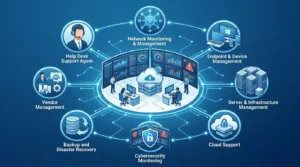
24/7 managed IT services can include monitoring, technical support, cybersecurity, cloud management, backups, and infrastructure maintenance. The exact services vary by provider and service plan, so businesses should review what is included in their agreement.
Service |
What It Covers |
24/7 IT Monitoring |
Monitors networks, servers, devices, and systems for outages, performance issues, and unusual activity. |
Help Desk Support |
Provides technical assistance for user issues, software problems, connectivity, and other IT requests. |
Network Management |
Monitors network performance, connectivity, routers, switches, and other network infrastructure. |
Endpoint Management |
Manages business computers, laptops, mobile devices, updates, configurations, and security controls. |
Cybersecurity Monitoring |
Helps identify suspicious activity, security alerts, malware threats, and other potential risks. |
Cloud Support |
Supports cloud platforms, user access, applications, and services such as Microsoft 365 or Google Workspace. |
Backup & Disaster Recovery |
Helps protect business data and supports recovery when systems are affected by failures, cyber incidents, or other disruptions. |
Patch Management |
Applies operating system and software updates to help address vulnerabilities and maintain system performance. |
Incident Response |
Investigates and responds to critical IT or security incidents according to the provider’s response procedures. |
Vendor Management |
Coordinates with software, hardware, internet, and other technology vendors when third-party issues affect business operations. |
The most crucial thing to remember is that “24/7” is not always an indication that every service is provided by a live technician. Before signing an agreement, confirm monitoring hours, live support availability, response times, escalation procedures, and service-level commitments.
What are the benefits of 24/7 Managed IT Services?
The main benefit of Managed IT Services 24/7 Support is uninterrupted business operations with fewer disruptions, stronger security, and predictable IT performance.
With continuous monitoring and support, businesses avoid downtime, reduce IT workload, and improve overall efficiency.
Key benefits include:
- Reduced downtime: Issues are detected and resolved before they impact daily operations. Studies show that proactive monitoring can reduce unplanned downtime by up to 50% compared to reactive IT support models.
- Improved security: Continuous monitoring helps identify suspicious activity, security vulnerabilities, and potential cyber threats before they cause damage.
- Lower IT costs: Businesses benefit from predictable monthly pricing, eliminating many of the unexpected expenses associated with break-fix IT support.
- Faster issue resolution: 24/7 Managed IT Support allows technical problems to be addressed quickly, reducing disruptions for employees and customers.
- Better scalability: IT infrastructure can easily adapt as business needs grow, making it easier to support additional users, devices, and locations.
- Increased productivity: Employees spend less time dealing with technical issues and more time focusing on their core responsibilities.
Overall, 24/7 managed IT support benefits help businesses maintain operational stability, strengthen cybersecurity, and improve long-term efficiency in an increasingly digital business environment.
How 24/7 Managed IT Support Reduces Downtime
24/7 IT support can reduce downtime by detecting problems early, responding to alerts quickly, and resolving or escalating critical incidents outside normal business hours. The faster an issue is identified and addressed, the less time employees and business systems may remain unavailable.
How the Process Helps Prevent Extended Downtime
- Detect the issue early: Continuous monitoring can identify a failed server, network interruption, unusual system behavior, or other problem.
- Assess the impact: The support team determines whether the issue affects one user, a department, or critical business systems.
- Respond immediately: Depending on the service agreement, technicians can begin troubleshooting remotely rather than waiting until the next business day.
- Escalate critical incidents: Issues requiring specialized expertise can be transferred to the appropriate technical or security team.
- Restore affected systems: The team works to restore services and verify that systems are functioning correctly.
- Review the incident: The issue is documented so recurring problems can be identified and preventive measures considered.
Example: An Overnight Server Failure
Suppose a business server fails at 2:00 a.m. Without after-hours monitoring or support, the problem may remain undetected until employees arrive the next morning.
With a 24/7 managed IT service, monitoring can generate an alert when the server becomes unavailable. The support team can investigate, attempt remote recovery, and escalate the incident if necessary. This can reduce the time between failure and response.
24/7 support does not guarantee zero downtime. Its purpose is to improve detection, response, recovery, and escalation so technology problems can be addressed as quickly as the provider’s service agreement allows.
How AI and Automation Improve Managed IT Services in 2026
AI and automation make Managed IT Services 24/7 Support faster, more proactive, and more reliable by reducing manual effort and improving issue detection.
Instead of waiting for users to report problems, modern systems use intelligent tools to identify and fix issues in real time.
How AI improves managed IT services:
- Predictive issue detection: Identifies system failures before they happen
- Automated patching: Keeps software and systems updated without delay
- Faster ticket handling: AI prioritizes and routes issues to the right team
- Reduced human error: Automation handles repetitive IT tasks more accurately
- Smarter monitoring: Systems learn usage patterns and detect anomalies
With these improvements, 24/7 managed IT support services become more efficient, reducing downtime and improving overall system stability for businesses.
Which Industries Need 24/7 Managed IT Services?
Some industries depend heavily on continuous system uptime, making Managed IT Services 24/7 Support essential for daily operations.
These businesses cannot afford downtime because even short disruptions can affect customers, compliance, or revenue.
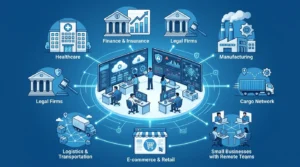
Industries that benefit most:
- Healthcare: Ensures patient data access, system uptime, and compliance support
- Finance & Insurance: Protects sensitive data and maintains secure transactions
- Legal Firms: Supports case management systems and secure document access
- Manufacturing: Keeps production systems and operations running smoothly
- Logistics & Transportation: Ensures real-time tracking and coordination systems stay active
- E-commerce & Retail: Prevents website downtime and payment failures
- SMBs with Remote Teams: Maintains secure access for distributed employees
For these industries, 24/7 IT Support for Businesses is not optional—it is critical for continuity, security, and customer satisfaction.
Does 24/7 Managed IT Support Cost More?
24/7 managed IT support can cost more than standard-hours support because it may require additional monitoring, staffing, security coverage, and after-hours response capabilities. However, the actual cost depends on the provider, number of users and devices, service scope, and required response times.
Common factors that affect pricing include:
- Number of users and devices: Larger environments generally require more monitoring and support resources.
- Service coverage: Monitoring-only services may cost less than plans that include 24/7 live technical support.
- Response requirements: Faster response and stricter SLAs can affect the service cost.
- Cybersecurity needs: Advanced security monitoring, threat detection, and incident response can increase the scope of services.
- Cloud and infrastructure: Servers, cloud platforms, multiple locations, and complex networks may require additional management.
- Backup and disaster recovery: Data protection and recovery services can add to the overall package.
- Business operating hours: Organizations that require continuous live support may need broader coverage than businesses operating only during standard hours.
When comparing providers, businesses should look beyond the monthly price. Check exactly what “24/7” includes, the guaranteed response time, escalation process, services covered, and any additional after-hours charges.
For businesses with limited after-hours risk, continuous monitoring with on-call escalation may be sufficient. Businesses with critical systems or round-the-clock operations may require both 24/7 monitoring and live technical support.
Why Do New Jersey Businesses Use 24/7 Managed IT Support?
New Jersey businesses may use 24/7 managed IT support to maintain reliable technology, protect business systems, and respond to IT issues outside standard working hours. The need varies by business size, industry, operating schedule, and technology environment.
For businesses across New Jersey, common reasons for using 24/7 managed IT support include:
- Cybersecurity: Continuous monitoring can help identify suspicious activity and security events that occur outside normal office hours.
- Hybrid and remote work: Distributed employees may need access to business applications, networks, and cloud services throughout the day.
- Business continuity: Faster detection and response can help limit disruption when critical systems experience an outage.
- Cloud dependence: Businesses using cloud applications and hosted systems may need ongoing monitoring and technical support.
- Limited internal IT resources: Small and midsize businesses may not have internal staff available to monitor and respond to issues around the clock.
- Scalable support: A managed provider can help support additional users, devices, locations, and technology as the business grows.
For New Jersey businesses evaluating a provider, the same core questions apply: Does the service include 24/7 human support, what are the response times, which systems are monitored, and how are critical incidents escalated?
TechProc provides 24/7 Managed IT Support for New Jersey businesses with a 5-minute response time, helping businesses get prompt assistance when IT issues occur.
How to Select the Best Managed IT Services Provider
Choosing the right provider for Managed IT Services 24/7 Support depends on how well they can deliver reliability, speed, and proactive IT management—not just basic troubleshooting.
A strong provider should prevent issues before they affect your business and ensure consistent system performance.
What to look for:
- Clear SLA commitments: Defined response and resolution times for critical issues
- True 24/7 support: Real engineers available anytime, not just ticket logging
- Strong security capabilities: Includes threat monitoring, endpoint protection, and compliance support
- Transparent reporting: Regular insights into system health and performance
- Scalability: Ability to support business growth without disruption
- Smooth onboarding process: Structured migration and setup with minimal downtime
A reliable 24/7 Managed IT Services Provider should act as a long-term IT partner, not just a support vendor, ensuring your systems stay secure, stable, and efficient as your business grows.
Also Read: What Are IT Consulting Services and Why Your Business Needs Them in 2026?
Faq’s
Q1):- What IT issues can 24/7 managed IT support handle?
Ans:- 24/7 managed IT support can handle network outages, server problems, device issues, cloud access problems, cybersecurity alerts, software issues, and other technical incidents. The exact coverage depends on the provider’s service agreement, support scope, and escalation procedures.
Q2):- How quickly can a 24/7 managed IT provider respond to a critical issue?
Ans:- Response times depend on the provider and SLA. TechProc offers a 5-minute response time for IT support, helping businesses receive prompt assistance when critical technology issues occur. Response time refers to acknowledging or beginning to address an issue, not necessarily resolving it within five minutes.
Q3):- What happens if an IT problem cannot be fixed remotely?
Ans:- If an issue cannot be resolved remotely, the provider can escalate it to a higher-level technician or specialist. Depending on the service agreement, this may also involve vendor coordination or on-site technical support.
Q4):- Does 24/7 managed IT support include on-site IT support?
Ans:- Not always. Some providers offer remote monitoring and support only, while others include on-site assistance as part of their service plan. Businesses should confirm whether on-site support is included, available on demand, or charged separately.
Q5):- Can 24/7 managed IT support work with an in-house IT team?
Ans:- Yes. A managed IT provider can work alongside an internal IT team through a co-managed IT model. The provider can handle monitoring, cybersecurity, help desk support, after-hours coverage, or specialized tasks while internal staff manage other IT responsibilities.
Q6):- Does a 24/7 managed IT service include help desk support?
Ans:- It can, but it depends on the service plan. Some providers offer 24/7 monitoring with limited support, while others include a live help desk around the clock. Businesses should confirm support hours, response times, covered issues, and escalation procedures before choosing a plan.
Q7):- Can businesses customize 24/7 managed IT services?
Ans:- Yes. Managed IT services can often be tailored to a business’s users, devices, network, cloud platforms, cybersecurity requirements, operating hours, and support needs. Businesses can choose the services and coverage that match their technology environment and risk requirements.
Q8):- What should a business check in a 24/7 managed IT support SLA?
Ans:- A 24/7 IT support SLA should clearly state monitoring coverage, support availability, response times, severity levels, escalation procedures, resolution targets, covered services, and exclusions. Businesses should also confirm whether the SLA covers 24/7 human support or only continuous monitoring.
Conclusion
Managed IT services in 2026 are essential for keeping businesses secure, stable, and always operational. With Managed IT Services 24/7 Support, companies can prevent downtime, improve cybersecurity, and ensure continuous IT performance through proactive monitoring and fast issue resolution.
In simple terms, 24/7 support helps businesses stay productive and avoid costly disruptions compared to traditional IT models.
For reliable Managed IT Services 24/7 Support in New Jersey, Techproc, an IT company in New Jersey, provides continuous monitoring, cybersecurity, and fast IT assistance to keep your business running without interruptions.