
Introduction
Managing IT in today’s fast-moving business world isn’t easy. From security threats to system downtime, there’s a lot to handle—which is why many businesses are turning to managed IT services for reliable and cost-effective support.
The demand for these services is growing fast. The global managed services market was valued at $330.4 billion in 2025 and is projected to cross $1.1 trillion by 2034. This shows a clear shift toward outsourcing IT instead of managing everything in-house.
But before making the switch, most business owners want to know one thing: how much does managed IT services cost? The truth is, the managed IT services cost can vary depending on your company’s size, IT setup, and the level of support you need.
In this guide, we’ll simplify everything—from the average cost of managed IT services to pricing models and key cost factors—so you can understand exactly what you’re paying for and why it matters.
Key Takeaways
- Most businesses pay a fixed monthly fee based on their size and IT needs.
- Pricing varies depending on users, devices, and level of support required.
- Managed services help reduce downtime and improve overall efficiency.
- Outsourcing IT is often more cost-effective than maintaining an in-house team.
What Are Managed IT Services?
Managed IT services are a way for businesses to outsource their IT operations to a third-party provider. Instead of handling everything in-house, you partner with experts who manage, monitor, and support your entire IT environment.
In simple terms, it’s like having a dedicated IT team—without the cost and hassle of hiring one internally. This is one of the main reasons why many companies are now evaluating the managed IT services cost as a long-term investment rather than just an expense.

Managed Services vs Break-Fix
Traditionally, businesses followed a “break-fix” approach. This means you only call an IT technician when something goes wrong—and pay for each issue separately.
Managed IT services take a completely different approach:
- Break-Fix Model: Reactive, unpredictable costs, higher downtime
- Managed IT Services: Proactive, fixed monthly pricing, fewer issues
With managed services, providers monitor your systems 24/7, fix problems before they escalate, and ensure everything runs smoothly. This proactive model helps reduce unexpected expenses and keeps your managed IT services monthly cost more predictable.
Who Needs Managed IT Services?
Managed IT services are not just for large enterprises. Businesses of all sizes can benefit, especially:
- Small businesses without a dedicated IT team
- Growing companies that need scalable solutions
- Organizations handling sensitive data that require strong cybersecurity
- Multi-location businesses needing centralized IT management
If your business relies heavily on technology (which most do), then understanding the cost of IT managed services becomes essential for long-term growth and stability.
What Do You Actually Pay for in Managed IT Services?
When businesses look at the managed IT services cost, one of the biggest questions is—what am I actually paying for?
Let’s break it down in simple terms.
1):- Help Desk Support
This is your first line of support whenever something goes wrong. Whether it’s a login issue, software error, or system crash, your team gets quick assistance.
Business impact: Less downtime and more productivity for your employees.
2):- Network Monitoring
Your IT provider continuously monitors your systems to detect issues before they become serious problems.
Business impact: Prevents costly downtime and keeps your operations running without interruptions.
3):- Cybersecurity
Security is a major part of the managed IT services costs today. This includes protection against malware, ransomware, phishing, and other cyber threats.
Business impact: Protects your sensitive data and avoids expensive security breaches.
4):- Cloud Management
If your business uses cloud platforms, managed IT services ensure everything is optimized, secure, and running efficiently.
Business impact: Better performance, scalability, and remote work support.
5):- Backup & Disaster Recovery
Regular backups and recovery solutions ensure your data is safe—even in case of system failure or cyberattacks.
Business impact: Minimizes data loss and ensures business continuity.
6):- Strategic IT Consulting
Beyond daily support, providers help you plan your IT strategy—whether it’s upgrading systems, improving security, or scaling operations.
Business impact: Smarter technology decisions that support long-term growth.
How Much Do Managed IT Services Cost?
The answer depends on your business size and IT needs, but here’s a quick overview:
- Per User: $100 – $250 per user/month
- Per Device: $60 – $150 per device/month
- Flat Monthly Pricing: $1,500 – $15,000+ per month
Your final managed IT services cost will depend on factors like team size, IT setup, security requirements, and support level.
It’s also interesting to look at how providers price their services. Per-user pricing is straightforward, but only about 22% of providers actually use it. In comparison, per-device pricing is much more common, with around 40–45% of providers relying on this model.
Managed IT Services Pricing Models Explained
The managed IT services cost depends on the pricing model you choose. Here’s a simple table to help you understand each option:
Pricing Model |
Cost Range |
Best For |
Key Benefit |
Per User Pricing |
$100 – $250 per user/month |
Businesses with a stable team |
Easy to manage and predictable |
Per Device Pricing |
$60 – $150 per device/month |
Companies with multiple devices |
Pay based on actual hardware usage |
Flat-Rate Monthly |
$1,500 – $15,000+/month |
Businesses needing full support |
Fixed cost, no surprises |
Tiered Packages |
Varies by plan |
Small to growing businesses |
Flexible options (Basic, Standard, Premium) |
Hybrid Pricing |
Custom pricing |
Complex IT environments |
Combines flexibility with scalability |
Choosing the right model can help you control your cost of managed IT services while getting the support your business actually needs.
What Is the Average Managed IT Services Cost by Business Size?
The managed IT services cost varies based on the size of your business. Here’s a clear breakdown to help you understand the average cost of managed IT services:
Business Size |
Employees |
Monthly Cost |
Annual Cost |
Small Business |
1–50 |
$1,500 – $5,000 |
$18,000 – $60,000 |
Mid-Sized Business |
50–250 |
$5,000 – $15,000 |
$60,000 – $180,000 |
Large Business / Enterprise |
250+ |
$15,000 – $20,000+ |
$180,000 – $250,000+ |
As your business grows, the managed IT services monthly cost increases—but it also delivers more value in terms of performance, security, and long-term efficiency.
What Factors Affect Managed IT Services Cost?
The managed IT services cost isn’t the same for every business. It changes based on your requirements, setup, and the level of service you expect. Here are the key factors that directly impact your total cost:
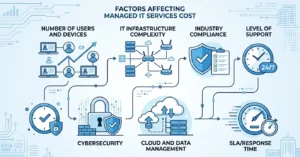
1):- Number of Users and Devices
The more employees and devices your business has, the more resources are needed to manage them. Each user, laptop, server, or network device adds to the overall managed IT services costs, especially if they require regular monitoring and support.
2):- IT Infrastructure Complexity
If your business operates across multiple locations, uses legacy systems, or relies on custom software, your IT environment becomes more complex. This directly increases the IT managed services cost, as it requires more time, expertise, and advanced tools to manage everything smoothly.
3):- Industry & Compliance Requirements
Some industries—like healthcare, finance, or legal—have strict compliance and data protection requirements. Meeting these standards often requires additional security layers, monitoring, and reporting, which increases the managed IT services monthly cost.
4):- Level of Support (24/7 vs Business Hours)
Basic support during business hours is more affordable, but if your business needs 24/7 monitoring and quick response times, the managed IT service cost will be higher. However, this level of support can prevent costly downtime.
5):- Cybersecurity Needs
Cyber security plays a major role in the average cost of managed IT services. Advanced protection like endpoint security, threat detection, and compliance monitoring adds to the cost—but it’s essential to protect your business from expensive cyber threats.
6):- Cloud & Data Management
If your business relies heavily on cloud platforms, data storage, and backups, your costs will increase. Managing cloud environments and ensuring data security requires additional resources, impacting the overall cost of IT managed services.
7):- SLA & Response Time Guarantees
Service Level Agreements (SLAs) define how quickly your IT provider responds to issues. Faster response times and stricter guarantees require more dedicated support, which can increase your managed IT services cost.
In short, the average cost of managed IT services depends on how much support, security, and scalability your business needs.
What Are the Hidden Costs in Managed IT Services?
When evaluating the managed IT services cost, most businesses focus only on the monthly fee. But in reality, there can be additional charges that increase your total investment if you’re not aware of them.
Understanding these hidden costs helps you better estimate the cost of managed IT services and avoid surprises later.
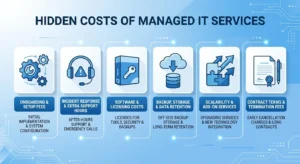
1):- Onboarding & Setup Fees
Most providers charge a one-time fee to set up your IT environment. This can include system configuration, network setup, security implementation, and data migration.
Depending on complexity, this can significantly impact your initial managed IT service cost.
2):- Incident Response & Extra Support Hours
Some plans include limited support hours. If your business needs additional help—especially during emergencies—you may be billed hourly.
These extra charges can increase your managed IT services monthly cost over time.
3):- Software & Licensing Costs
Not all tools are included in your package. Solutions like antivirus, endpoint protection, Microsoft 365, or backup software may require separate licenses.
This adds to the overall IT managed services cost, especially for growing businesses.
4):- Backup, Storage & Data Retention
Basic backups are often included, but extended storage or long-term data retention (for compliance) may cost extra.
Businesses with large data volumes should carefully evaluate this part of the managed IT services costs.
5):- Scalability & Add-On Services
As your business grows, adding new users, devices, or services (like advanced cybersecurity or cloud upgrades) can increase costs.
Make sure you understand how scaling affects your average cost of managed IT services.
6):- Contract Terms & Termination Fees
Some providers require long-term contracts and may charge penalties for early cancellation.
Always review terms carefully to avoid unexpected increases in your managed IT services cost.
How to Optimize Your Managed IT Services Cost
Managing your managed IT services cost effectively isn’t just about choosing the cheapest provider—it’s about getting the best value for your investment. With the right approach, you can reduce unnecessary expenses while still getting high-quality IT support.
1):- Choose the Right Pricing Model
Select a pricing structure that fits your business. For example, per-user pricing works well for stable teams, while flat-rate plans offer better predictability.
This helps control your overall cost of managed IT services.
2):- Avoid Unnecessary Services
Not every business needs advanced features or premium packages. Focus on services that directly support your operations.
This keeps your managed IT services monthly cost aligned with your actual needs.
3):- Right-Size Your IT Plan
As your business grows or changes, your IT requirements will too. Regularly review your plan to ensure you’re not overpaying or underutilizing services.
This helps maintain an efficient IT managed services cost.
4):- Invest in Preventive Support
Proactive monitoring and maintenance may seem like an added cost, but they prevent expensive issues in the future.
This reduces your long-term managed IT services costs.
5):- Conduct Regular IT Assessments
Periodic reviews help identify gaps, inefficiencies, and opportunities to optimize your IT environment.
This ensures you’re getting the best value from your average cost of managed IT services.
Also Read: What Are Managed IT Services and How Do They Work?
FAQs
Q1):- Are managed IT services cheaper than in-house IT?
Ans:- In most cases, yes. The managed IT services cost is often lower than hiring and maintaining a full in-house IT team, especially when you consider salaries, tools, and infrastructure.
Q2):- Can small businesses afford managed IT services?
Ans:- Yes, many providers offer flexible plans designed for smaller businesses. The cost of managed IT services can be adjusted based on your needs, making it affordable and scalable.
Q3):- How is managed IT services cost calculated?
Ans:- The managed IT services cost is usually calculated based on the number of users, devices, level of support, and security requirements. Providers may use per-user, per-device, or flat-rate pricing models.
Q4):- Does managed IT services cost include cybersecurity?
Ans:- In most cases, basic cybersecurity is included. However, advanced protection like threat detection and compliance monitoring may increase the cost of managed IT services.
Conclusion
Understanding the managed IT services cost is essential if you want to make a smart, long-term decision for your business. While pricing can vary based on your size, needs, and IT complexity, one thing is clear—managed services offer predictable costs, better security, and improved efficiency.
Instead of reacting to problems, you get proactive support that helps prevent issues before they impact your operations. That alone can save your business time, money, and stress in the long run.
The key is to focus on value, not just price. When you choose the right provider, the cost of managed IT services becomes an investment that supports growth, reduces risks, and keeps your business running smoothly.
Looking to optimize your IT and reduce costs? Get in touch today for a customized managed IT services solution tailored to your business needs.