Introduction
Choosing an IT provider is an important business decision, especially when your technology supports everyday operations, customer data, communication, and security. With many IT companies in New Jersey offering managed IT, cybersecurity, cloud, networking, and consulting services, it can be difficult to know which provider fits your requirements.
A reliable managed service provider (MSP) should do more than respond when something goes wrong. It should help maintain your IT environment, address security risks, provide timely technical support, and adapt its services as your business changes.
Before choosing an MSP, compare its service coverage, cybersecurity capabilities, support response times, service-level agreements (SLAs), technical expertise, pricing, business continuity solutions, and contract terms. These factors can help you understand what you are actually getting for your IT investment.
This guide covers how to evaluate IT companies in New Jersey, what questions to ask potential providers, how to compare different IT service models, and what to look for before signing an MSP agreement.
Key Takeaways
- The right MSP should match your business needs, cybersecurity requirements, budget, and growth plans.
- Compare services, support response times, SLAs, industry experience, pricing, and scalability before choosing a provider.
- Don’t choose an MSP based on price alone. Check exactly what is included in the agreement.
- A reliable MSP should provide proactive IT support, strong security, backup, and business continuity.
IT Companies in New Jersey: Quick Comparison
The table below gives a quick overview of 12 IT companies in New Jersey based on their primary services, pricing approach, potential business fit, and publicly available support information.
IT Company | Main Services | Pricing Approach | Potential Fit | Response / Support |
TechProc | Managed IT, cybersecurity, cloud, network solutions, IT consulting, business continuity, desktop support | Custom | Businesses, educational institutions, and public-sector organizations | About 5 minutes |
DigaCore | Managed IT, infrastructure, cloud, cybersecurity, backup and disaster recovery | Monthly custom, premium | SMBs, regulated businesses | About 1 hour* |
SWK Technologies | Managed IT, cloud hosting, network support, ERP, Microsoft 365, consulting | Custom | SMBs and mid-sized businesses | Not publicly stated |
Exigent Technologies | Managed IT, cybersecurity, cloud, network infrastructure, business continuity | Custom | Healthcare, finance, legal, and other regulated businesses | Not publicly stated |
Integrated Computer Services (ICS) | Managed IT, cybersecurity, cloud, IT support, infrastructure management | Custom | Small and mid-sized businesses | Not publicly stated |
Integris | Managed IT, cybersecurity, compliance, cloud, backup, advisory services | Custom | Regulated and growing businesses | Not publicly stated |
Panurgy | Managed IT, co-managed IT, cybersecurity, cloud, business continuity, IT consulting, cabling | Custom | Businesses with internal or outsourced IT needs | Not publicly stated |
Olmec Systems | Managed IT, IT support, cloud, IT consulting, outsourcing, co-managed IT | Custom | Organizations needing managed or outsourced IT | Not publicly stated |
Micro Strategies | Enterprise IT, cloud, security, managed services, analytics, infrastructure | Custom | Larger organizations and complex IT environments | Not publicly stated |
eMazzanti Technologies | Managed IT, cloud, cybersecurity, network services, Microsoft 365, business continuity | Custom | SMBs and organizations with cloud and security needs | Not publicly stated |
Rivell | Managed IT, help desk, network management, cybersecurity, Microsoft 365, cloud, backup and disaster recovery | Custom | Businesses seeking ongoing IT management | Not publicly stated |
Link High Technologies | Managed IT, cybersecurity, cloud, co-managed IT, IT consulting | Custom | Growing businesses and organizations needing managed IT | Not publicly stated |
Note: This is a comparison guide, not a ranking or endorsement. Services, pricing, and response commitments may vary by provider and service agreement.
What Is an MSP and What Does an MSP Do?
An MSP (Managed Service Provider) is an external IT partner that manages, monitors, and supports a business’s technology on an ongoing basis. Instead of waiting for problems to occur, an MSP takes a proactive approach to keep systems reliable, secure, and available.
For businesses comparing IT Companies In New Jersey, understanding what an MSP actually provides makes it easier to compare service packages and choose the right provider.
What Is a Managed Service Provider?
A managed service provider handles specific IT responsibilities for a business under an ongoing service agreement. Depending on the provider and plan, this may include technical support, network management, cybersecurity, cloud services, backups, and IT consulting.
For example, an MSP may help a business:
- Monitor computers, servers, and network devices
- Provide help desk and desktop support
- Install software updates and security patches
- Manage network infrastructure
- Monitor cybersecurity threats
- Manage cloud platforms and applications
- Maintain data backups
- Support disaster recovery
- Coordinate technology vendors
- Plan future IT improvements
The exact services vary between providers, so businesses should always check what is included before signing an agreement.
Assess Your IT Needs With TechProc
Tell us about your business, current IT environment, and technology challenges to get a tailored IT assessment for your organization.
What Services Do MSPs Typically Provide?
The services offered by IT Companies In New Jersey can vary, but most full-service MSPs cover several core areas.
a):- Managed IT Services: Ongoing monitoring, maintenance, troubleshooting, and technical support.
b):- Help Desk and Desktop Support: Assistance with computers, applications, user accounts, devices, and everyday technology issues.
c):- Network Management: Monitoring and maintaining routers, switches, wireless networks, firewalls, and other network infrastructure.
d):- Cybersecurity: Security monitoring, endpoint protection, email security, vulnerability assessments, employee training, and incident response.
e):- Cloud Solutions: Cloud migration, Microsoft 365 support, cloud infrastructure, backup, and ongoing management.
f):- Backup and Disaster Recovery: Protecting business data and helping restore systems after a technology failure or security incident.
g):- Business Continuity: Planning and technology solutions that help businesses continue critical operations during disruptions.
h):- IT Consulting: Strategic guidance for technology upgrades, infrastructure changes, cloud projects, and long-term IT planning.
How Do Managed IT Services Differ From Traditional IT Support?
Traditional IT support is often reactive. A problem occurs, the business reports it, and a technician works on fixing it.
Managed IT services take a more proactive approach. The provider continuously monitors systems, maintains technology, identifies potential problems, and provides ongoing support.
Traditional IT Support | Managed IT Services |
Often reactive | Proactive |
Fixes problems after they occur | Monitors systems to identify problems early |
May charge hourly | Often uses recurring monthly pricing |
Limited strategic planning | Ongoing IT planning |
May be project-based | Continuous support |
Monitoring may be limited | Regular monitoring and maintenance |
For a business with an internal IT team, an MSP can also provide co-managed IT support instead of replacing the existing team. The best model depends on the company’s size, technical requirements, internal expertise, and long-term goals.
Why Are New Jersey Businesses Hiring MSPs in 2026?
New Jersey businesses use MSPs to manage growing IT demands, strengthen security, reduce downtime, and access specialized expertise without building a large internal IT team. This makes managed IT services a practical option for businesses comparing IT companies in NJ.
1):- How Can an MSP Reduce IT Downtime?
An MSP can reduce IT downtime through proactive monitoring, maintenance, updates, and faster issue detection. Splunk reports that the average cost of IT downtime is $15,000 per minute, making early problem detection important for businesses.
2):- Can an MSP Improve Cybersecurity?
Yes. An MSP can strengthen cybersecurity through endpoint protection, security monitoring, patch management, MFA, email security, backups, and incident response. Verizon’s 2025 DBIR found that SMBs were targeted nearly four times more than large organizations, making cybersecurity an important factor when comparing MSPs.
3):- Can Managed IT Services Make IT Costs More Predictable?
Yes. Many MSPs charge a recurring monthly fee based on users, devices, locations, or service scope. Always check whether projects, hardware, after-hours support, and third-party tools cost extra.
4):- Can an MSP Support Remote and Hybrid Employees?
Yes. MSPs can manage cloud applications, remote access, employee devices, identity controls, and help desk support. This is especially useful for businesses operating across multiple New Jersey locations.
5):- Can an MSP Help a Growing Business Scale Its Technology?
Yes. An MSP can support new users, devices, locations, cloud applications, and security requirements as the business grows. Scalability should therefore be an important factor when comparing it to companies in New Jersey.
How to Choose the Right IT Company in New Jersey
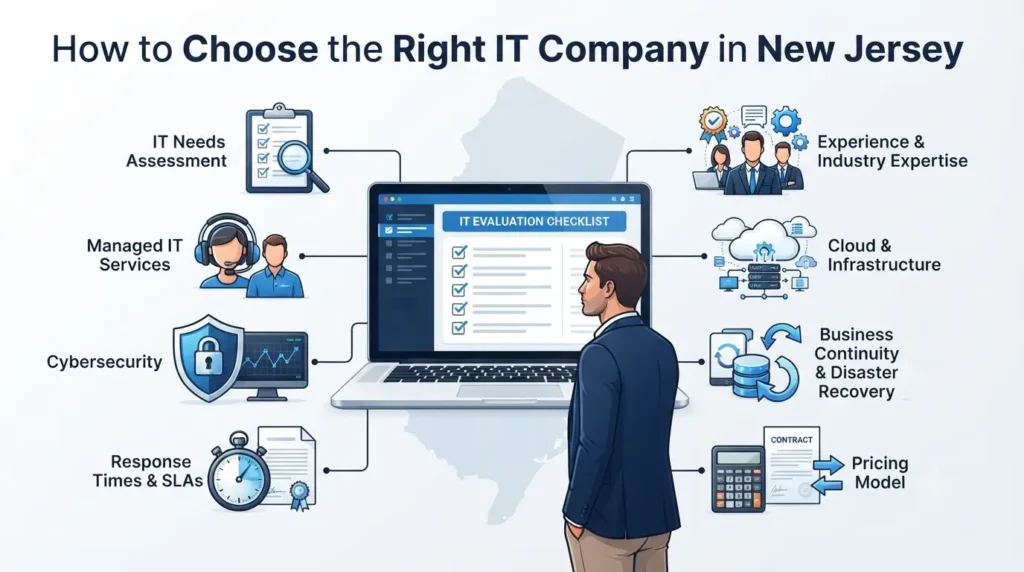
The best way to choose an MSP is to first understand your business’s IT requirements and then compare providers against the same criteria. This helps you focus on service quality, security, support, and long-term fit rather than price alone.
1. Identify Your Business’s IT Needs First
Start by reviewing your:
- Number of employees and devices
- Office locations
- Current IT problems
- Internal IT resources
- Cloud environment
- Cybersecurity and compliance needs
- Backup and business continuity requirements
- Expected business growth
Should You Choose Fully Managed, Co-Managed, or Project-Based IT Support?
The right model depends on how much IT responsibility your business wants to keep internally.
- Fully managed IT: Best when you want an MSP to handle most day-to-day IT operations.
- Co-managed IT: Useful when you have an internal team but need additional expertise, security support, or project assistance.
- Project-based IT: Suitable for specific needs such as cloud migration, network upgrades, office moves, or infrastructure projects.
Understanding your needs first makes it easier to compare consulting companies and choose the right service model.
2. Check the MSP’s Managed IT Services
Don’t choose an MSP simply because it advertises “complete IT support.” Ask what services are actually included and how they are delivered. This is especially important when comparing IT companies in nj.
What Should Be Included in Managed IT Services?
Depending on the provider, look for:
- 24/7 or business-hours monitoring
- Help desk and desktop support
- Patch management
- Device management
- Network management
- Vendor management
- Backup management
- Regular reporting
- Preventive maintenance
- IT documentation
A good MSP should clearly explain what it monitors, maintains, secures, and supports. When comparing it companies in New Jersey, also check which services are included in the monthly fee and which are billed separately.
3. Evaluate Cybersecurity Services
Cybersecurity should be a major factor when comparing IT companies in New Jersey because an MSP that manages your IT should also understand how to protect it.
What Cybersecurity Services Should an MSP Provide?
Depending on your business needs, look for:
- Endpoint and network security
- Email security
- Multi-factor authentication (MFA)
- Security monitoring
- Vulnerability assessments
- Employee security training
- Incident response
- Backup and recovery
How Do You Know Whether an MSP Takes Cybersecurity Seriously?
Don’t rely on a provider simply saying it offers cybersecurity. Ask how security alerts are monitored, how quickly incidents are handled, whether MFA and patching are included, and how often backups and recovery procedures are tested.
When comparing it consulting companies nj or a tech support company nj, look for documented security processes, relevant certifications, and clear responsibilities in the service agreement.
4. Compare Response Times and SLAs
Response time matters when an IT issue affects employees, customers, or critical systems. When comparing IT companies in New Jersey, look for clear service-level agreements (SLAs) rather than vague promises of “fast support.”
How Quickly Should an MSP Respond to IT Issues?
There is no single response time for every business. Critical issues, such as a network outage, should receive a higher priority than routine requests like software installation.
Ask providers to define response targets for different ticket priorities.
What Should an MSP SLA Include?
A clear SLA should cover:
- Critical and normal ticket priorities
- Response times
- Resolution expectations
- Support availability
- Escalation procedures
- After-hours support
- Uptime commitments
Also check the difference between response time and resolution time. An MSP may respond quickly without guaranteeing that the issue will be fixed within the same timeframe.
5. Look at Experience and Industry Expertise
An MSP with experience in your industry can understand your technology risks and operational requirements faster. When comparing IT companies in New Jersey, look for providers that have worked with businesses similar to yours in size, industry, and IT environment.
Does the MSP Have Experience With Businesses Like Yours?
Different industries have different IT needs. Healthcare organizations may require stronger privacy and compliance controls, while law firms need secure document and client-data management. Manufacturers may depend heavily on reliable networks and infrastructure.
Ask potential IT consulting companies about similar clients, relevant projects, and the technologies they manage.
What Certifications Should You Look For?
Depending on your environment, relevant credentials may include:
- Microsoft certifications or partnerships
- Cisco certifications
- CompTIA certifications
- Cybersecurity certifications
- Cloud certifications
Certifications are useful, but they should be considered alongside experience, customer references, security practices, and SLA commitments.
6. Evaluate Cloud and Infrastructure Expertise
Your MSP should be able to support both your current infrastructure and future technology plans.
Ask whether it can manage:
- Microsoft 365
- Cloud migration
- Cloud backup
- Hybrid infrastructure
- Remote access
- Servers
- Network infrastructure
If cloud adoption is part of your growth strategy, choose an MSP with the expertise to plan, secure, and manage that environment.
7. Check Business Continuity and Disaster Recovery
Your MSP should have a clear plan for protecting and restoring critical systems.
Ask about:
- Data backups
- Disaster recovery
- Backup testing
- System restoration
- Downtime procedures
- Recovery objectives
A backup strategy is only useful if your business can actually restore its systems when something goes wrong.
8. Understand the MSP’s Pricing Model
Price matters, but it should not be the only factor when comparing IT Companies In New Jersey.
How Much Do Managed IT Services Cost in New Jersey?
Pricing can depend on users, devices, locations, security requirements, cloud services, support coverage, and contract scope. Providers may use per-user, per-device, monthly package, project-based, or hybrid pricing.
What Is Included in the Monthly MSP Fee?
Ask whether your agreement includes help desk support, monitoring, cybersecurity, backups, network management, cloud support, on-site assistance, and after-hours support.
Should You Choose the Cheapest MSP?
Not necessarily. A lower price may also mean fewer services or limited support. Compare the total service, security, response time, expertise, and long-term value before making your decision.
Top IT Companies In New Jersey to Consider in 2026
Businesses searching for top IT companies in New Jersey will find providers with different services, specialties, and support models. The right choice depends on your business size, IT requirements, security needs, and budget.
1. TechProc
Location/service area: New Jersey, New York, and Connecticut.
Core services: Managed IT services, cybersecurity, cloud solutions, network and infrastructure management, IT consulting, business continuity, desktop support, IT assessments, and structured cabling.
Best fit: Businesses, educational institutions, and public-sector organizations looking for a broader IT partner covering infrastructure, cybersecurity, technical support, cloud, and strategic technology needs.
Key strengths: TechProc states that it has 10+ years of experience, 150+ projects delivered, and 100K+ hours of IT work. Its services cover managed IT, cybersecurity, cloud and Microsoft 365 management, network infrastructure, backup and business continuity, IT consulting, and desktop support.
Service model: Managed and strategic IT support that includes proactive monitoring, help desk services, endpoint and infrastructure management, cybersecurity and 24×7×365 security monitoring, backup and disaster recovery, IT assessments, and strategic IT advisory services.
Support: TechProc states that it provides US-based support, an average 5-minute response time, and 99.9% network uptime.
Compliance and certifications: TechProc states that it supports requirements and frameworks including HIPAA, PCI-DSS, NIST, CMMC, FISMA, CJIS, and FERPA, with technical professionals holding Microsoft, Cisco, and Fortinet certifications.
2. DigaCore
Location/service area: Based in Lakewood, New Jersey, with service coverage across multiple New Jersey locations.
Core services: Managed IT, IT infrastructure, cloud computing, cybersecurity, remote IT support, and backup and disaster recovery.
Best fit: Small and growing businesses looking for managed IT and infrastructure support.
Key strengths: DigaCore states that it has supported businesses since 2016 and reports a 6-minute average response time, 75% first-contact ticket resolution, and a 17-minute average resolution time. These are company-reported figures and should be evaluated alongside your own SLA requirements.
Service model: Managed IT and technology support with an emphasis on proactive issue resolution and ongoing infrastructure management.
3. SWK Technologies
Location/service area: East Hanover, New Jersey, serving New Jersey and surrounding Tri-State and Pennsylvania markets.
Core services: Managed IT services, IT support, network support, infrastructure monitoring, and consulting.
Best fit: Small and mid-sized businesses that need managed infrastructure and IT support.
Key strengths: SWK states that its New Jersey managed services include 24x7x365 monitoring of critical infrastructure and data, unlimited help desk and documentation services, and onsite support for qualifying plans.
Service model: Managed IT with options that combine remote monitoring, help desk services, and onsite network support.
4. Exigent Technologies
Location/service area: Morristown, New Jersey, with a focus on Northern New Jersey.
Core services: Managed IT, cybersecurity, cloud solutions, network infrastructure, business continuity, and Microsoft 365/Azure services.
Best fit: Small and mid-sized businesses, particularly organizations in regulated industries.
Key strengths: Exigent states that it has more than 25 years in business, offers fully managed and co-managed IT, and serves industries including healthcare, legal, nonprofit, and manufacturing.
Service model: Fully managed and co-managed IT with remote and onsite support options.
5. Integrated Computer Services
Location/service area: Glen Rock, New Jersey, with services extending beyond the state.
Core services: Managed IT, cybersecurity, cloud solutions, IT support, and infrastructure management.
Best fit: Organizations looking for U.S.-based support and continuous IT management.
Key strengths: ICS reports 10,000+ endpoints under management, 60,000+ technical support tickets closed per year, and 26 IT experts on staff. It also states that it provides 24/7/365 support and is SOC 2 Type II audited.
Service model: Managed IT with U.S.-based support, 24/7 monitoring, and emergency support.
6. Integris
Location/service area: Cranbury, New Jersey, as part of a national managed services platform.
Core services: Managed IT, service desk, cybersecurity, backup, cloud strategy, migrations, advisory services, vCISO, and governance, risk, and compliance.
Best fit: Highly regulated small and mid-sized businesses.
Key strengths: Integris specifically highlights community banking, law firms, healthcare, manufacturing, and nonprofits and offers fully managed and co-managed options.
Service model: Local New Jersey support combined with a broader managed services platform.
7. Panurgy
Location/service area: Cedar Knolls, New Jersey, serving Northern New Jersey and surrounding markets.
Core services: Managed IT, cybersecurity, cloud computing, business continuity, IT consulting, structured cabling, and co-managed IT.
Best fit: Businesses that need managed services or additional support for an internal IT team.
Key strengths: Panurgy offers managed and co-managed IT, 24/7 monitoring, cybersecurity, cloud services, business continuity, and IT consulting. It also states that its IT consulting practice covers cloud migration, infrastructure implementation, structured cabling, Azure consulting, cybersecurity compliance, and vCIO services.
Service model: Fully managed and co-managed IT with flat-rate service options.
8. Olmec Systems
Location/service area: Denville, New Jersey, with New Jersey and broader U.S. coverage.
Core services: Managed IT, IT support, IT consulting, cloud services, IT outsourcing, and co-managed IT.
Best fit: Organizations that need outsourced IT or additional technical resources.
Key strengths: Olmec states that it has served organizations since 1996 and supports industries including healthcare, legal, manufacturing, finance, nonprofits, and education.
Service model: Managed and outsourced IT with remote and onsite support capabilities.
9. Micro Strategies
Location/service area: Parsippany, New Jersey, with broader regional and national capabilities.
Core services: Infrastructure solutions, cloud computing, security, managed services, analytics, business process solutions, and implementation/support services.
Best fit: Organizations with more complex infrastructure, data, security, analytics, or business technology requirements.
Key strengths: Micro Strategies was founded in 1983 and lists expertise across infrastructure, cloud computing, security and mobility, managed services, analytics, and business process management.
Service model: Technology consulting, managed services, infrastructure, security, and business technology solutions.
10. eMazzanti Technologies
Location/service area: Hoboken, New Jersey, with national and international support capabilities.
Core services: IT support, cloud services, security and privacy, network services, Microsoft 365, business continuity, and industry-specific IT solutions.
Best fit: Businesses seeking managed IT, cloud, security, and industry-focused technology services.
Key strengths: eMazzanti offers 24/7 IT support and lists solutions for retail, government and education, manufacturing, nonprofit, legal, and municipalities.
Service model: Managed support and technology consulting with cloud, security, and industry-specific solutions.
11. Rivell
Location/service area: New Jersey, including South Jersey and the broader Tri-State area.
Core services: Managed IT, help desk, network management, server oversight, cybersecurity, Microsoft 365, cloud management, and backup and disaster recovery.
Best fit: Businesses looking for ongoing infrastructure management and proactive IT support.
Key strengths: Rivell describes its managed IT model as continuous monitoring combined with help desk support, infrastructure management, cybersecurity, cloud management, and business continuity.
Service model: Unified managed IT services with ongoing infrastructure and technology oversight.
12. Link High Technologies
Location/service area: Florham Park, New Jersey, with service coverage across New Jersey, New York, and Pennsylvania.
Core services: Managed IT, cybersecurity, cloud solutions, co-managed IT, and IT consulting.
Best fit: Growing businesses that need managed IT and cybersecurity support.
Key strengths: Link High describes itself as a managed IT and cybersecurity provider for growing companies and offers Microsoft Azure, private cloud, Office 365, managed cybersecurity, and co-managed IT services.
Service model: Managed and co-managed IT with cybersecurity and cloud services.
Important: A company appearing on this list does not automatically make it the best choice for every business. Before selecting a provider, compare its current services, pricing, support coverage, experience, reviews, SLA, and contract terms against your specific requirements.
How Do You Compare IT Companies in New Jersey?
The best way to compare IT Companies In New Jersey is to evaluate each provider using the same criteria. Instead of choosing an MSP based only on price or a long service list, look at its support model, cybersecurity capabilities, experience, contract terms, and ability to support your business as it grows.
Step 1: Create Your IT Requirements List
Start by documenting what your business actually needs. Include the number of employees and devices, office locations, current IT problems, cloud platforms, cybersecurity requirements, compliance needs, and future technology plans.
This gives you a clear checklist to use when speaking with different MSPs.
Step 2: Shortlist 3–5 MSPs
Don’t compare every provider in the market. Shortlist three to five MSPs that match your business size, industry, location, technology environment, and required services.
A smaller shortlist makes it easier to have detailed conversations and compare proposals.
Step 3: Send Every Provider the Same Requirements
Give each MSP the same information about your IT environment and ask for a detailed proposal.
Using the same requirements helps you make a fair comparison and prevents one provider from appearing cheaper simply because fewer services are included.
Step 4: Compare Services and Pricing
Look beyond the monthly fee. Check exactly what each provider includes, such as help desk support, monitoring, cybersecurity, backups, network management, cloud support, and on-site assistance.
Also ask about additional charges for projects, emergency support, after-hours service, or services outside the standard agreement.
Step 5: Review SLAs
A service-level agreement should clearly explain what happens when you need support. Compare response times, support hours, escalation procedures, uptime commitments, and service responsibilities.
For critical IT issues, make sure the promised response time is clearly documented rather than based on a verbal guarantee.
Step 6: Check References and Reviews
Reviews and references can help you understand what working with an MSP is actually like. Look for feedback about technical expertise, communication, response times, reliability, and problem resolution.
If possible, ask the provider for references from businesses with similar requirements.
Step 7: Evaluate Cybersecurity
Ask each MSP how it protects your systems and data. Find out whether the service includes endpoint protection, network security, email security, vulnerability management, security monitoring, incident response, and backup protection.
Don’t accept a general “cybersecurity included” statement without understanding what it covers.
Step 8: Ask About Onboarding
A smooth transition is important when changing IT providers. Ask how the MSP will handle your systems, documentation, user accounts, devices, network information, security settings, and existing vendors.
A clear onboarding plan can reduce disruption during the transition.
Step 9: Review the Contract
Before signing, carefully review the contract length, cancellation terms, included services, additional fees, SLA commitments, data ownership, and exit process.
Make sure you understand what happens if your business eventually decides to change providers.
Step 10: Choose Based on Long-Term Fit
The right MSP should support your current needs while also being able to handle future growth. Consider whether the provider can support new employees, locations, cloud services, cybersecurity requirements, and infrastructure changes as your business expands.
What Warning Signs Should You Watch for When Choosing an MSP?
Not every company is a good fit for every MSP. When comparing IT Companies In New Jersey, watch for warning signs that could lead to poor support, unexpected costs, or security gaps.
1):- Unclear Pricing
If a provider cannot clearly explain what is included in the monthly fee, ask for a detailed breakdown. You should also know which services, projects, or support requests may cost extra.
2):- No Clearly Defined SLA
An MSP should provide clear expectations for response times, support availability, and issue escalation. Avoid relying only on verbal promises.
3):- Slow or Inconsistent Communication
If an MSP is difficult to reach during the sales process, ask how it handles support tickets and critical issues after you become a customer.
4):- Reactive Rather Than Proactive Support
An MSP should do more than fix problems after they happen. Look for regular monitoring, maintenance, patching, and preventive IT management.
5):- Weak Cybersecurity Capabilities
Be cautious if a provider makes broad security claims but cannot explain how it monitors threats, protects devices, manages vulnerabilities, or responds to incidents.
6):- No Tested Backup or Recovery Strategy
Simply having backups is not enough. Ask whether backups are monitored and regularly tested and how quickly critical systems can be restored.
7):- Limited Scalability
Your IT provider should be able to support additional employees, locations, cloud services, and changing technology requirements as your business grows.
8):- No Relevant Industry Experience
Different industries can have different technology, security, and compliance requirements. Look for an MSP that understands businesses similar to yours.
9):- Long Contracts With Unclear Exit Terms
Before signing, understand the contract length, cancellation process, data ownership, and what happens to your systems and documentation if you switch providers.
10):- Promises Without Measurable Commitments
Be cautious of vague claims such as “fast support” or “complete security.” Ask for specific, measurable commitments that can be included in the SLA.
The key is to evaluate what an MSP can actually deliver, not just what it promises. This makes it easier to separate reliable IT Companies In New Jersey from providers that may not meet your long-term needs.
When Should You Switch to a New MSP?
You should consider switching MSPs when your current provider no longer meets your business’s IT, security, support, or growth requirements. The decision should be based on repeated service problems rather than a single technical issue.
1):- Your IT Problems Keep Repeating
If the same technical problems continue without a permanent solution, your MSP may be taking a reactive approach instead of addressing the underlying cause.
2):- Your Provider Is Slow to Respond
Frequent delays in responding to support requests can affect employee productivity and business operations. Check whether the provider is consistently meeting its agreed SLA response times.
3):- Your Business Has Outgrown the MSP
Your current provider may have been suitable when your company was smaller but may not have the resources, expertise, or coverage needed as you add employees, locations, or technology.
4):- Your Cybersecurity Needs Have Changed
New security risks, compliance requirements, or changes in your IT environment may require stronger cybersecurity services than your current MSP provides.
5):- Your Cloud Requirements Have Increased
If your business is moving more applications or systems to the cloud, your MSP should have the expertise to support migration, security, backup, and ongoing cloud management.
6):- IT Costs Are Difficult to Predict
Frequent unexpected charges or unclear service fees can make IT budgeting difficult. A clearer pricing and service model may provide better cost visibility.
7):- Your MSP Isn’t Providing Strategic Guidance
An MSP should do more than close support tickets. If your provider rarely discusses technology risks, infrastructure improvements, cybersecurity, or future IT planning, it may be time to evaluate other IT Companies In New Jersey.
Before switching, review your current contract, document recurring problems, and compare potential providers carefully. A planned transition can reduce disruption and make the move to a new MSP much smoother.
Also Read: How Much Does an IT Consultant Cost in 2026? A Complete Pricing Breakdown
Frequently Asked Questions
Q1):- How Much Do Managed IT Services Cost in New Jersey?
Ans:- Managed IT costs depend on users, devices, locations, security, cloud services, and support needs. Compare quotes from multiple IT companies in New Jersey using the same requirements.
Q2):- What Is the Difference Between an MSP and an IT Company?
Ans:- An IT company provides technology services, while an MSP manages IT systems on an ongoing basis. MSPs typically provide continuous monitoring, support, maintenance, and strategic IT services.
Q3):- What Should an MSP SLA Include?
Ans:- An MSP SLA should define response times, ticket priorities, support hours, escalation procedures, availability, and applicable resolution or uptime commitments.
Q4):- How Long Does It Take to Switch MSPs?
Ans:- Switching an MSP can take from a few weeks to several months, depending on your IT environment. Complex networks, multiple locations, servers, and compliance requirements may require more time.
Q5):- Can an MSP Work With an Internal IT Team?
Ans:- Yes. Co-managed IT allows an MSP to support an internal team with specialized expertise, cybersecurity, cloud management, network monitoring, projects, or after-hours support.
Conclusion
Choosing among it companies in New Jersey is easier when you compare providers on services, cybersecurity, support, SLAs, pricing, experience, and scalability. The right MSP should solve your current IT needs while supporting future growth.
For businesses seeking managed IT, cloud, network, cybersecurity, business continuity, and desktop support, TechProc is one New Jersey provider worth considering for ongoing technology support.