
Introduction
In today’s fast-moving digital world, businesses need systems that can keep up with constant change. Flexibility, speed, and security are no longer optional—they’re essential. That’s why many organizations are shifting from traditional on-premise infrastructure to modern cloud-based solutions.
Cloud migration process of moving your business data, applications, and IT workloads from physical servers to a cloud environment. This move helps companies scale more easily, cut down infrastructure costs, and improve overall efficiency.
The shift toward the cloud is happening quickly across industries. In fact, the cloud migration services market is expected to grow from USD 19.28 billion to USD 143.7 billion by 2035, with a CAGR of 22.24%. This rapid growth clearly shows how businesses are prioritizing cloud adoption as part of their long-term strategy.
In this blog, we’ll explain what is cloud migration, break down the cloud migration process, explore different migration models, and cover the key benefits, challenges, and best practices for a successful transition.
Key Takeaways
- Cloud migration is all about moving your business data, applications, and systems from on-premise servers to the cloud
- A well-planned approach makes the transition smooth, secure, and minimizes downtime
- Businesses can lower costs, strengthen security, and improve overall efficiency
- With the right cloud migration services, companies can modernize their IT infrastructure and scale faster
What Is Cloud Migration?
It’s the process of moving your business data, applications, servers, and workloads from on-premise systems to a cloud-based environment.
In simple words, it means shifting your IT setup from physical infrastructure to a secure and scalable cloud platform. This type of migration in cloud computing allows businesses to become more flexible, reduce infrastructure costs, and easily scale resources based on demand.

Cloud migration can take different forms, including:
- Moving from on-premise systems to the cloud
- Switching from one cloud provider to another (cloud-to-cloud migration)
- Using a hybrid setup that combines on-site and cloud systems
- Adopting a multi-cloud approach with multiple providers
For example, a company might move its databases, applications, and files to the cloud while keeping certain legacy systems running on local servers.
This shift is accelerating across industries. According to Gartner, global spending on public cloud services reached around $675.4 billion in 2024, growing by over 20% compared to the previous year.
Similarly, Flexera’s 2024 report shows that nearly half of all workloads are already running in the public cloud, and about 89% of organizations are using multi-cloud environments.
All of this clearly shows that cloud migration is no longer just an option—it has become a smart and necessary step for businesses looking to grow and stay competitive.
How Does Cloud Migration Work?
The cloud migration process isn’t something you do overnight. It requires careful planning and a step-by-step approach to ensure everything moves smoothly without disrupting business operations.
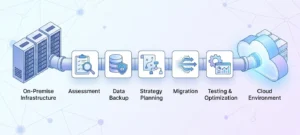
1. Assess Current Infrastructure
The first step is to analyze your existing IT environment. This includes reviewing servers, applications, databases, and dependencies to decide what should be migrated, updated, or removed.
2. Back Up Critical Data
Before starting the migration on cloud, it’s essential to create secure backups of all important data. This reduces the risk of data loss and keeps your business protected during the transition.
3. Build a Cloud Migration Strategy
Next comes creating a clear cloud migration strategy. This involves choosing the right cloud platform, setting timelines, defining security measures, and deciding whether the migration will happen in phases or all at once.
4. Migrate Data and Applications
Once the plan is ready, the actual migration in cloud computing begins. Data, applications, and workloads are transferred to the cloud environment based on the selected approach.
5. Test and Optimize
After the migration is complete, systems are tested to ensure everything is working properly. Performance checks, security validation, and optimization help improve efficiency and reliability.
A well-structured cloud migration process helps businesses minimize downtime, improve system performance, and transition smoothly to a modern IT environment.
What Are the Types of Cloud Migration?
Not every business follows the same approach when moving to the cloud. The right cloud migration strategy depends on your current systems, business goals, and how much transformation you’re aiming for.
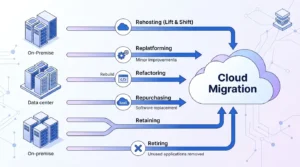
Here are the most common types of cloud migration:
1. Rehosting (Lift and Shift)
This is one of the quickest ways to handle migration on cloud. Applications and workloads are moved as they are, without major changes. It’s ideal for businesses looking for a fast and cost-effective solution.
2. Replatforming
In this approach, applications are moved to the cloud with slight improvements. While the core system remains the same, small adjustments are made to enhance performance and scalability.
3. Refactoring (Re-architecting)
This method involves redesigning applications to fully utilize cloud capabilities. It’s best suited for businesses planning long-term digital transformation and scalability.
4. Repurchasing
Here, businesses replace their existing software with cloud-based SaaS solutions. For example, switching from a traditional CRM to a cloud-based CRM platform.
5. Retaining
Some systems may still need to stay on-premise. In this case, businesses keep certain critical applications locally while migrating others to the cloud, creating a hybrid environment.
6. Retiring
This step involves identifying outdated or unused applications and removing them instead of migrating. It helps reduce complexity and unnecessary costs.
Choosing the right approach is a key part of successful cloud migration services, as it directly impacts performance, cost, and future scalability.
What Are the Cloud Migration Deployment Models?
When planning a cloud migration strategy, choosing the right deployment model is just as important as choosing the migration type. The right model depends on your business goals, security needs, compliance requirements, and budget.
Here are the most common cloud migration deployment models:
1):- Public Cloud
In a public cloud model, your data, applications, and workloads are hosted on shared infrastructure managed by a cloud provider such as AWS, Microsoft Azure, or Google Cloud.
This is one of the most popular options because it offers high scalability, lower upfront costs, and flexible pay-as-you-go pricing.
2):- Private Cloud
A private cloud is dedicated to a single business or organization. It offers more control over data, security, and compliance.
This model is often preferred by industries that handle sensitive data, such as healthcare, finance, or legal services.
3):- Hybrid Cloud
A hybrid cloud combines both on-premise infrastructure and cloud-based resources.
For example, a business may keep sensitive data on local servers while moving applications and storage to the cloud. This model offers flexibility and is a common choice for businesses transitioning gradually through migration in cloud computing.
4):- Multi-Cloud
In a multi-cloud setup, businesses use services from multiple cloud providers instead of relying on just one.
For example, one provider may be used for storage while another is used for applications or analytics. This helps improve redundancy, performance, and vendor flexibility.
What Are the Different Cloud Migration Service Models?
When planning a cloud migration strategy, it’s important to understand the different service models available. Each model offers a different level of control, flexibility, and management based on your business needs.
1):- Infrastructure as a Service (IaaS)
IaaS provides virtual servers, storage, and networking resources through the cloud.
In this model, the cloud provider manages the physical infrastructure, while your business controls the operating systems, applications, and data. It is a great option for businesses that need more control over their IT environment.
2):- Platform as a Service (PaaS)
PaaS gives businesses a ready-to-use platform for building, testing, and deploying applications.
It includes tools such as databases, operating systems, development frameworks, and middleware, making it ideal for software development teams.
3):- Software as a Service (SaaS)
SaaS is a fully managed software solution delivered online.
Businesses can access the software directly through a web browser without worrying about installation, maintenance, or updates. Common examples include CRM software, email tools, and cloud collaboration platforms.
Why Is Cloud Migration Important for Modern Businesses?
As businesses grow, their technology needs grow too. Traditional on-premise systems often struggle to keep up with increasing workloads, remote teams, and rising maintenance costs. That’s why cloud migration has become an important step for modern businesses.
1):- Outdated IT Systems
Legacy systems can slow down operations and make it difficult to adopt new technologies. Through migration in cloud computing, businesses can modernize their infrastructure and improve overall efficiency.
2):- Rising Maintenance Costs
Managing physical servers, software updates, and hardware repairs can be expensive. Cloud solutions help reduce these costs by shifting the infrastructure burden to the cloud provider.
3):- Better Support for Remote Work
Modern teams need secure access to data and applications from anywhere. Cloud platforms make it easier for employees to work remotely without affecting productivity.
4):- Improved Security and Disaster Recovery
Cloud environments often include advanced security features, regular updates, and backup solutions. This makes it easier for businesses to protect critical data and recover quickly from unexpected disruptions.
In simple terms, cloud migration services help businesses stay agile, cost-efficient, and ready for future growth in a fast-changing digital world.
What Are the Common Challenges in Cloud Migration?
While the benefits of cloud migration are significant, the process can also come with a few challenges. Understanding these early helps businesses build a stronger cloud migration strategy and avoid costly mistakes.
1):- Downtime Risks
One of the biggest concerns during the cloud migration process is downtime. If systems are not migrated in phases or properly tested, business operations can be temporarily disrupted.
2):- Data Loss Concerns
Moving large volumes of files, databases, and applications always carries some risk. Without proper backups and validation, important business data can be lost or corrupted during the transition.
3):- Security and Compliance Issues
Sensitive business data must remain protected during and after migration. Companies in regulated industries also need to ensure compliance with standards like HIPAA, PCI-DSS, or GDPR.
4):- Legacy System Compatibility
Older applications and systems may not work smoothly in modern cloud environments. In some cases, they need to be reconfigured, updated, or completely rebuilt.
5):- Network Latency
Some workloads, especially those that rely on real-time processing, may face performance issues due to network delays after moving to the cloud.
6):- Organizational Change
Cloud migration often changes how teams work, access data, and use applications. Employee training and change management are important for a smooth transition.
The good news is that most cloud migration challenges can be managed with the right planning, testing, and expert support.
What Are Cloud Migration Tools and Technologies?
A successful cloud migration process is much easier when businesses use the right tools and technologies. These tools help reduce complexity, improve accuracy, and ensure a smooth transition from on-premise systems to the cloud.
1):- Cloud Provider Migration Tools
Major cloud platforms offer built-in tools to support migration, such as:
- AWS Migration tools for moving servers and databases
- Microsoft Azure migration services for infrastructure and applications
- Google Cloud migration tools for data and workload transfer
These tools help automate parts of the migration in the cloud computing process and reduce manual effort.
2):- Third-Party Cloud Migration Tools
Apart from cloud providers, many third-party solutions also help with migration, monitoring, and optimization. These tools assist in analyzing workloads, managing dependencies, and ensuring smooth data transfer.
3):- Monitoring and Performance Tools
After migration, monitoring tools help businesses track performance, security, and resource usage in real time. This ensures the cloud environment continues to run efficiently after deployment.
4):- Automation and Deployment Tools
Automation tools simplify repetitive tasks like configuration, testing, and deployment. They help speed up the overall cloud migration strategy while reducing human error.
What Are the Latest Cloud Migration Trends in 2026?
Cloud adoption is growing faster than ever, and businesses are now focusing on smarter, more flexible ways to manage their IT systems. These new trends are shaping how cloud migration is planned and executed in 2026.
1):- Hybrid Cloud Adoption is Increasing
More businesses are choosing hybrid setups that combine on-premise systems with cloud environments. This approach gives better control over sensitive data while still enjoying cloud flexibility.
2):- Multi-Cloud Strategies Are Becoming Common
Instead of relying on a single provider, companies are using multiple cloud platforms. This improves performance, reduces dependency, and increases system reliability.
3):- AI-Powered Cloud Management
Artificial intelligence is now being used to optimize workloads, predict usage patterns, and improve resource allocation. This makes the cloud migration process more efficient and cost-effective.
4):- Stronger Focus on Cybersecurity (Zero Trust Models)
Security remains a top priority, and businesses are adopting zero-trust frameworks to protect data across cloud environments. This helps reduce risks during and after migration to the cloud.
5):- Growth of Cloud-Native Applications
Companies are increasingly building applications directly for the cloud instead of migrating old systems. This improves scalability, speed, and long-term performance.
Also Read: Cyber Resilience vs Cyber Security: Which One Is More Important for Your Business?
FAQ’s
Q1):- What is lift and shift in cloud migration?
Ans:- Lift and shift is a cloud migration method where applications are moved to the cloud without major changes, making it a faster and simpler migration approach.
Q2):- Why do businesses migrate to the cloud?
Ans:- Businesses migrate to the cloud to reduce IT costs, improve scalability, enhance security, and support remote work and digital transformation.
Q3):- Is cloud migration secure?
Ans:- Yes, cloud migration is secure when proper security measures such as encryption, access control, and compliance standards are applied during and after the migration process.
Q4):- What are the benefits of cloud migration?
Ans:- Cloud migration helps businesses reduce IT costs, improve scalability, strengthen data security, and ensure better business continuity and performance.
Q5):- How long does cloud migration take?
Ans:- The timeline varies based on system size and complexity. It can take a few weeks for smaller workloads or several months for large enterprise-level migrations.
Conclusion
Cloud adoption is no longer optional—it’s essential for businesses that want to stay competitive in today’s digital world. Understanding what is cloud migration helps organizations make better decisions about managing their data, applications, and IT systems.
The benefits of cloud migration are clear, including lower costs, better scalability, improved security, and support for remote work. However, success depends on the right cloud migration strategy and a well-planned cloud migration process.
While challenges like downtime and security risks can occur, they can be managed with proper planning and expert support.
Techproc, an IT company in New Jersey, helps businesses with reliable cloud security services, IT consulting, and managed IT solutions for a smooth and secure transition to the cloud.