
Introduction
A cloud migration checklist helps businesses move their applications, data, and IT infrastructure to the cloud in a secure, organized, and cost-effective way. Without a clear plan, cloud migration can lead to unexpected downtime, security risks, higher costs, and performance issues.
More businesses are moving to the cloud than ever before. Global cloud migration spending is expected to grow from $232 billion in 2024 to more than $800 billion by 2029, showing how quickly organizations are adopting cloud technologies. Today, over 90% of businesses use some form of cloud infrastructure to improve flexibility, scalability, and operational efficiency.
However, moving to the cloud doesn’t always guarantee success. Studies show that nearly 30% of cloud spending is wasted because of poor planning, underused resources, and inefficient migration strategies. That’s why having a well-structured cloud migration checklist is essential. It helps you prepare every stage of the migration, reduce risks, protect critical business data, and make the transition as smooth as possible.
In this guide, we’ll walk through the complete Cloud Migration Checklist for 2026, explain each step, and share practical tips to help your business migrate with confidence.
Key Takeaways
- A cloud migration checklist helps businesses move to the cloud in a secure and organized way.
- Proper planning reduces downtime, security risks, data loss, and unexpected costs.
- Choosing the right cloud strategy and testing everything before launch are key to a successful migration.
- Continuous monitoring after migration helps improve performance, security, and cost efficiency.
What Is Cloud Migration?
Cloud migration is the process of moving your business applications, data, and IT systems from on-premise servers to a cloud platform like AWS, Microsoft Azure, or Google Cloud. It allows businesses to replace physical infrastructure with flexible, scalable, and internet-based cloud services.

There are several ways to migrate to the cloud, depending on your business needs:
- Lift and Shift: Move applications to the cloud with little or no changes.
- Re-platforming: Make small improvements before migrating.
- Re-architecting: Redesign applications to take full advantage of cloud features.
- Hybrid Migration: Use both on-premise infrastructure and cloud services together.
Cloud migration is more than a technology upgrade. It helps businesses improve scalability, strengthen security, reduce IT costs, and support future growth.
Why Cloud Migration Matters in 2026
Cloud migration is essential in 2026 because it helps businesses stay secure, flexible, and competitive. As technology evolves, more organizations are moving to the cloud to improve performance, support remote work, and scale their operations with ease.
A well-planned cloud migration checklist also helps businesses reduce IT costs, strengthen cybersecurity, and meet compliance requirements. With the right cloud strategy, you can quickly adjust resources as your business grows without disrupting daily operations.
Simply put, moving to the cloud isn’t just about upgrading your IT infrastructure—it’s about preparing your business for long-term success.
The Complete Cloud Migration Checklist (Step‑by‑Step Framework)
A successful migration to the cloud doesn’t happen by chance—it requires a clear, structured plan. A well‑defined Cloud Migration Checklist helps businesses avoid confusion, reduce risks, and ensure every step is handled in the right order.
It also makes the transition smoother, especially when moving complex systems from on‑premise infrastructure to the cloud.
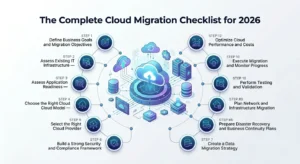
Here’s a practical step‑by‑step framework businesses in 2026 can follow for a smooth migration:
Step 1 – Define Business Goals and Migration Objectives
The first step in a Cloud Migration Checklist is to define why you’re moving to the cloud. Clear goals help you choose the right migration strategy and measure its success.
Common migration goals include:
- Reduce IT infrastructure costs
- Improve cybersecurity
- Support remote and hybrid work
- Increase scalability
- Modernize legacy systems
- Strengthen disaster recovery
Set measurable objectives, such as improving system uptime to 99.99%, reducing infrastructure costs by 20%, or boosting application performance.
Clear goals keep your cloud migration checklist focused and help ensure a smooth, successful migration.
Step 2 – Assess Existing IT Infrastructure
The next step in a Cloud Migration Checklist is to assess your current IT infrastructure. Understanding your existing environment helps identify potential challenges before the migration begins.
Review your:
- Servers
- Databases
- Applications
- Storage systems
- Network infrastructure
- Security tools
- Legacy systems
This assessment helps uncover outdated systems, application dependencies, and performance issues that could affect the migration. It also helps you estimate cloud costs, create a realistic migration timeline, and choose the best migration approach for your business.
Step 3—Assess Application Readiness
Before migrating, make sure your applications are ready for the cloud. Not every application can be moved without changes, so it’s important to evaluate each one carefully.
Check whether your applications:
- Need software upgrades
- Require performance improvements
- Depend on legacy hardware
- Have security or compliance requirements
Also, consider each application’s business value, migration complexity, and performance needs. This helps you decide whether to rehost, replatform, or re-architect the application.
Assessing application readiness early reduces migration risks and ensures a smoother cloud transition.
Step 4 – Choose the Right Cloud Model
Choosing the right cloud model is an important part of a successful cloud migration checklist. The best option depends on your business goals, budget, security needs, and compliance requirements.
The most common cloud models include:
- Public Cloud: Best for scalability, flexibility, and cost efficiency.
- Private Cloud: Ideal for businesses that need greater control and stronger security.
- Hybrid Cloud: Combines on-premise infrastructure with cloud services for added flexibility.
- Multi-Cloud: Uses multiple cloud providers to improve reliability and reduce vendor dependency.
Selecting the right cloud model helps improve performance, support future growth, and ensure your cloud environment meets your business requirements.
Step 5 – Select the Right Cloud Provider
Choosing the right cloud provider is just as important as choosing the right cloud model. The provider you select will affect your cloud’s performance, security, scalability, and long-term costs.
When comparing cloud providers, consider:
- Security and compliance certifications
- Service Level Agreements (SLAs)
- Data center locations
- Backup and disaster recovery options
- Customer support
- Scalability and performance
Popular cloud providers include AWS, Microsoft Azure, and Google Cloud. Instead of focusing only on pricing, choose a provider that aligns with your business needs and long-term growth goals.
Step 6 – Build a Strong Security and Compliance Framework
Security should be part of every stage of your cloud migration checklist. Protecting your data and meeting compliance requirements helps reduce cyber risks and ensures a secure cloud migration.
Your security plan should include:
- Multi-factor authentication (MFA)
- Identity and Access Management (IAM)
- Role-based access control (RBAC)
- Data encryption at rest and in transit
- Firewall and endpoint security
- Continuous monitoring
If your business handles sensitive data, make sure your cloud environment complies with standards such as GDPR, HIPAA, PCI DSS, SOC 2, or ISO 27001. A strong security framework helps protect your business before, during, and after migration.
Step 7 – Create a Data Migration Strategy
Data migration is one of the most sensitive parts of any cloud migration project.
Before moving data, businesses should:
- Remove outdated files
- Eliminate duplicate data
- Organize critical workloads
- Validate backups
- Identify sensitive information
There are several migration methods businesses can choose from:
Migration Method |
Best For |
Main Advantage |
Bulk Migration |
Large data transfers |
Faster migration |
Incremental Migration |
Active business workloads |
Reduced downtime |
Database Replication |
Critical applications |
Real-time synchronization |
A strong cloud application migration checklist always includes data validation and backup testing before migration begins.
Step 8 – Prepare Disaster Recovery and Business Continuity Plans
A cloud migration checklist should always include a disaster recovery and business continuity plan. Being prepared for unexpected issues helps minimize downtime and keeps your business running during the migration.
Your plan should include:
- Regular data backups
- Disaster recovery procedures
- Failover systems
- Redundant infrastructure
- Multi-region availability
Also, define your Recovery Time Objective (RTO), which is the maximum acceptable downtime, and Recovery Point Objective (RPO), which is the maximum amount of data your business can afford to lose.
A well-planned recovery strategy helps ensure business continuity and reduces the impact of unexpected disruptions.
Step 9 – Plan Network and Infrastructure Migration
Planning your network and infrastructure is a key step in a successful cloud migration checklist. A well-designed network helps ensure secure connectivity, reliable performance, and minimal disruption during migration.
Review and prepare your:
- VPN connectivity
- Firewall rules
- DNS configuration
- Secure remote access
- IP settings
- Hybrid cloud connectivity
Also, plan your compute resources, storage, virtual machines, and auto-scaling settings to match your workload requirements. Proper network and infrastructure planning helps improve cloud performance and supports long-term business growth.
Step 10 – Perform Testing and Validation
Testing your cloud environment before going live is a critical step in a cloud migration checklist. It helps identify issues early and ensures your applications, data, and systems work as expected after migration.
Before deployment, perform:
- Performance testing
- Security testing
- Load testing
- User Acceptance Testing (UAT)
- Failover and backup recovery testing
Thorough testing helps reduce migration risks, prevent unexpected downtime, and ensure a smooth transition to the cloud.
Step 11 – Execute Migration and Monitor Progress
Once testing is complete, it’s time to begin the cloud migration. During this stage, closely monitor the migration to ensure everything is working as expected and address any issues quickly.
Keep track of:
- System performance
- Data synchronization
- Application behavior
- Security alerts
- Migration progress
It’s also a good idea to have a rollback plan in case unexpected problems occur. Continuous monitoring helps ensure a smooth migration with minimal disruption to your business.
Step 12 – Optimize Cloud Performance and Costs
Cloud migration doesn’t end after your workloads go live. The final step in your cloud migration checklist is to optimize performance and control cloud costs over time.
After migration, make sure you:
- Right-size cloud resources
- Remove unused workloads
- Monitor cloud spending
- Optimize storage usage
- Enable auto-scaling
- Continuously monitor performance
Regular optimization helps improve efficiency, reduce unnecessary costs, and ensure your cloud environment continues to support your business as it grows.
What Are the Common Cloud Migration Challenges?
Even with a well-planned cloud migration checklist, businesses can face challenges during the migration process. Understanding these risks in advance helps you plan better and avoid costly mistakes.
1. Unexpected Downtime
Poor planning can lead to system outages that disrupt daily operations. A phased migration and proper backup plan help minimize downtime.
2. Data Loss
Moving large volumes of data without proper validation can result in data loss or corruption. Regular backups and data verification are essential.
3. Cost Overruns
Cloud costs can increase if resources aren’t managed properly. Monitoring usage and optimizing resources help keep expenses under control.
4. Security Risks
Weak security controls can expose sensitive data during migration. Using encryption, access controls, and compliance best practices helps protect your environment.
5. Poor Planning
Skipping key migration steps can lead to delays, performance issues, and unexpected problems. Following a structured cloud migration checklist helps ensure a smoother and more successful migration.
How Techproc Ensures a Smooth Cloud Migration
Techproc, a trusted IT company in New Jersey, helps businesses move to the cloud without stress or disruption. We begin by analyzing your IT environment and creating a tailored Cloud Migration Checklist that fits your goals and infrastructure.
Our experts handle everything from planning and data migration to security setup and testing, ensuring minimal downtime and maximum data safety.
With strong expertise in cloud solutions and managed IT services, Techproc ensures your migration is smooth, secure, and future-ready.
Also Read: Types of Cloud Computing Services Every Business Should Know in 2026
FAQ’s
Q1):- What is a Cloud Migration Checklist?
Ans:- A Cloud Migration Checklist is a step-by-step guide that helps businesses plan, execute, and manage the process of moving data, applications, and IT systems from on-premise infrastructure to the cloud in a structured and secure way.
Q2):- Why is a Cloud Migration Checklist important in 2026?
Ans:- A Cloud Migration Checklist is important in 2026 because it helps businesses reduce risks like downtime, data loss, and cost overruns while ensuring a smooth, secure, and efficient transition to cloud-based systems.
Q3):- What are the main steps in cloud migration?
Ans:- The main cloud migration steps include assessing IT infrastructure, defining goals, selecting a cloud model, choosing a provider, planning data migration, testing systems, and optimizing performance after migration.
Q4):- What is the biggest risk in cloud migration?
Ans:- The biggest risks in cloud migration include data loss, unexpected downtime, security vulnerabilities, and poor planning. These risks can be minimized by following a proper Cloud Migration Checklist.
Conclusion
Cloud migration is no longer just a technical upgrade—it’s a business necessity in 2026. With increasing demand for scalability, security, and cost efficiency, moving to the cloud can unlock major growth opportunities for modern businesses.
However, success depends on how well the process is planned and executed. A well-structured Cloud Migration Checklist helps businesses reduce risks, avoid downtime, and ensure a smooth transition from on-premise systems to the cloud.
From evaluating infrastructure and choosing the right cloud model to securing data and optimizing performance, every step plays an important role in achieving a successful migration.
If you are planning to move your business to the cloud, working with an experienced partner can make all the difference.